
Nihon Kohden · Patient monitoring
Central station CNS-2101
CNS-2101
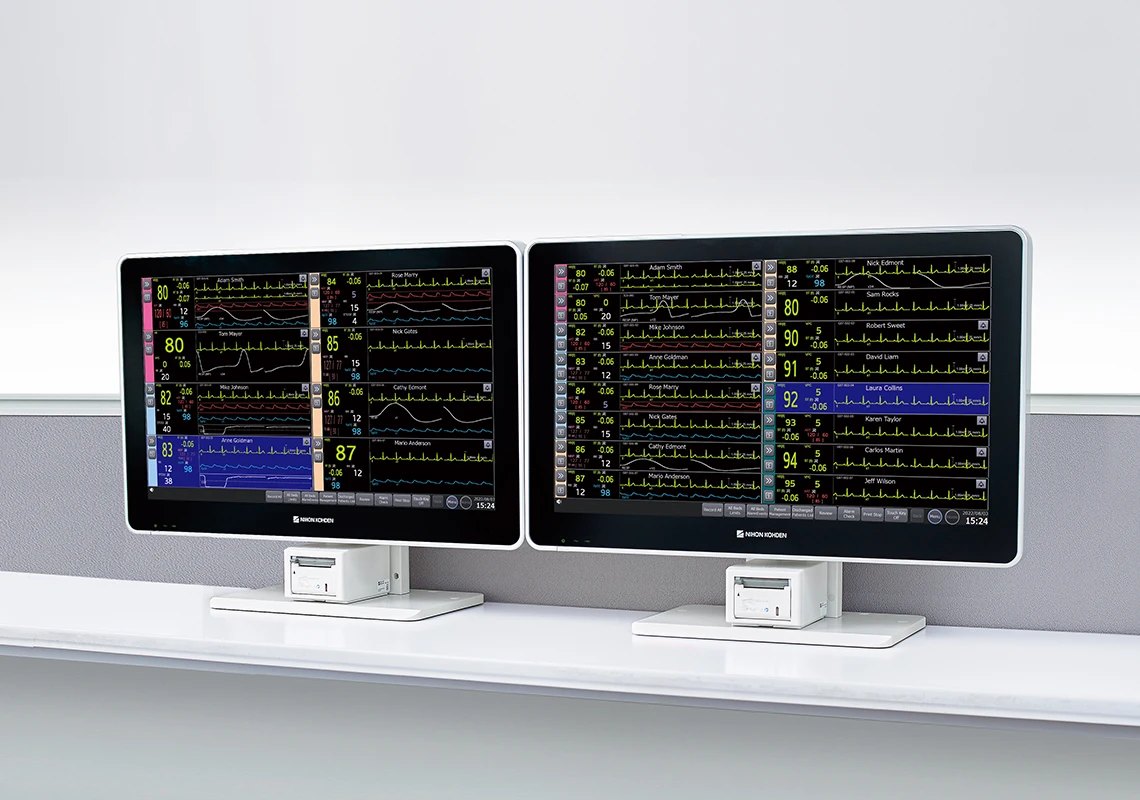
Central monitor as a panel PC with flat touchscreen, HL7 interface to the electronic patient record (EPR) system and alarm escalation; expandable with licences for 16, 24 or 32 beds.
- Version
- Panel PC, all-in-one
- Licences
- 16, 24 or 32 beds
- Interface
- HL7 to EPR system
- Price
- On quote
For owners of this device
Do you have this device?
Choose what you need. We fill in Central station CNS-2101 for you.
The CNS-2101 is a central station in panel PC design in which display, alarm indicator and main unit are combined. It shows time-synchronised review data, supports alarm escalation and sends vital values and alarm data via HL7 to the electronic patient record (EPR) system. The number of beds is determined by a software licence for 16, 24 or 32 beds.
Specifications
- Version
- Panel PC: display, alarm indicator and main unit are combined in one device.
- Mounting
- On a stand (DM-140P) or on the wall (KG-210P).
- Screen
- Flat touchscreen with direct-bonding technology: better visibility of numbers and waveforms, less glare and more sensitive touch operation.
- Cleaning
- The flat panel makes cleaning with disinfectant and removing excess liquid easier.
- Operation
- App-based icons for quick access to information.
- HL7 interface
- Sends vital values and alarm data via the HL7 protocol to the electronic patient record (EPR) system, directly or via a gateway.
- Transport
- With a Life Scope PT as input box, all monitoring data is also shown during transport.
- Review data
- Various review data via tabs; all review data is time-synchronised, including SpO2 trends and 12-lead ECG analysis
- ViTrac
- Near real-time status updates, within the hospital network or outside the hospital via VPN; suitable for Windows, iOS and Android. Available options: contact the Nihon Kohden representative.
- Alarm overview
- Alarm events of all patients in one overview; per patient, the details in the Alarm Events window.
- Alarm settings by administrator
- The administrator manages Alarm Master, Alarm Level and Alarm Volume.
- Alarm escalation
- The alarm priority escalates depending on duration, value, etc. Example: SpO2 lower limit with normal priority "Warning"; with a value drop of 5%, priority "Crisis" follows.
- Licences for number of beds
- QL-017P: up to 16 beds. QL-018P: up to 24 beds. QL-019P: up to 32 beds.
- Other software options
- HL7/Arrhythmia recall waveform out (QL-009P), Physiological Examination System Compatibility License (QL-010P), Host1000 Application License (QL-015P), PDF Output License (QL-029P)
- Hardware options
- Recorder Unit WS-140P, Stand DM-140P, Wall-mount KG-210P, Wall-mount Handle DZ-140P, Recorder Holder DH-140P
- Other specifications
- On request. Ask us for the full technical data of this model.
Documents
Need the datasheet, instructions for use or CE declaration of Central station CNS-2101? We send them on request.
Request documents →IT and network
For your ICT department: what we know from the manufacturer's documentation. We agree the requirements for your hospital with your ICT.
- Interfaces (HL7, PACS, ADT)
- Sends vital values and alarm data via the HL7 protocol to the EMR system, directly or via a gateway.
Software option: HL7/Arrhythmia recall waveform out (QL-009P). - Other
- ViTrac: near real-time status updates, within the hospital network or outside the hospital via VPN; suitable for Windows, iOS and Android.
A full IT checklist for your hospital ICT? Ask us.
Request the IT checklist →About this system
One partner, from delivery to maintenance
We supply, install and maintain the device, and we supply the consumables. That gives you one point of contact for everything around your system.
Installation and instruction
On site, with your team.
Training
The content is stated in the quote.
Inspection and maintenance
We record the arrangements in your quote or service contract.
Remote support
Where your hospital allows VPN or TeamViewer, we can look in remotely.
Knowledge for this system
Other Nihon Kohden systems
Try first
Try Central station CNS-2101 first?
One of our colleagues will schedule a demo at your department.